Count your steps.
Keep them to yourself.
A simple step counter for Android that stores everything on your phone. No account, no ads, no cloud. Try it free for 7 days.
replace with official badge image
Free for 7 days, then $5 a year
Cancel any time in Google Play · price varies by country
- No cloud
- No account
- No ads
- No internet access
Benefits and Features
Keep scrolling: the phone scrolls through the real main screen, just like using the app, and each part is explained beside it.Scroll the phone like you would the app. Tap a number on the screen to see what that part does.

- 1
Private by default, free for 7 days
The badge isn’t marketing: the app has no internet permission. A slim line shows the trial days left. Nothing is ever uploaded.
- 2
Today, at a glance
One big number. With a daily goal, a circle fills around it and shows your percent; green when you get there.
- 3
Goals, each optional
Weekly and monthly progress bars, green at 100 %. One button sets all three goals; a tap fills week and month from your daily goal.
- 4
Reports you can tap
Day, Week, Month, Year with arrows back through a year of history. Tap a bar for its exact count; the dashed line is your goal.
- 5
Your records
Best day, best week, last week, and this week against the same days last week. No leaderboard, no feed.
- 6
Settings you’ll actually use
Pause counting. Hide your count from the lock screen. Include in Android backup, off by default. Add the home screen widget. Pick an app language.
- 7
Your data, your buttons
Export daily totals or full detail as CSV, import on a new phone, delete older data, or erase everything. Nothing is deleted unless you say so.
Your data is private
- No cloudYour history is never uploaded. "In the cloud" means out of your hands; this stays in them.
- No internet accessThe app has no internet permission, so it can't send anything anywhere.
- No accountNothing to sign up for. No profile, no password.
- No adsFree for 7 days, then $5 a year. That's the whole business model.
Your data the way you want it
Things you can see for yourself in the first day, not promises in a policy.
Your count is on screen within minutes
Open the app, allow two permissions, walk. Today's number appears at the top, in a quiet notification, and on the widget if you add one.
It never asks you to sign in
There is no account screen because there is no account. Nothing to create, nothing to forget.
Airplane mode changes nothing
The app has no internet permission, so counting and reports work the same offline. Check Android's app info: internet isn't listed. The only thing that needs a connection is the subscription, and that's done by the Google Play app, not by PrivateSteps.
No cloud, by design
Your history is never uploaded anywhere. If you want it elsewhere, you export a file and you decide where it goes.
Your history builds up, day by day
Hourly bars for today, daily bars for the week and month, monthly bars for the year. Records appear once you've walked a bit.
Nothing follows you around
No ads, no analytics, no crash reporting, no sharing. If you like it after 7 days, you pay $5 a year and can cancel any time; that's the whole relationship.
The bottom menu: four tabs, one phone
Everything is one tap away along the bottom of the screen, and everything stays on your phone.
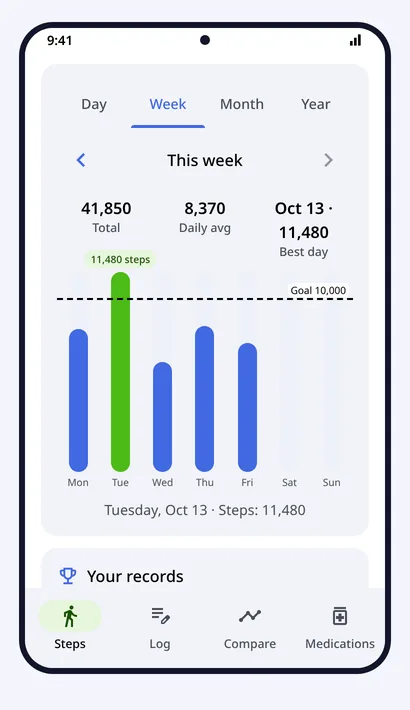
Steps
Today's count and goal circle, Day, Week, Month and Year reports you can tap, your records, and your settings.
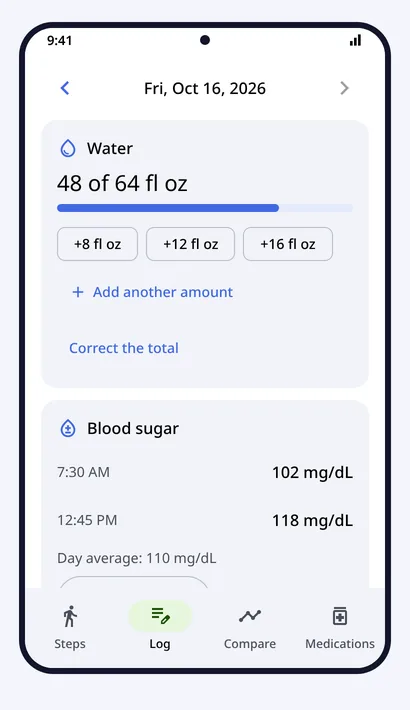
Log
Count your water, and write down your own blood sugar (as many entries a day as you like), weight and cholesterol. Choose the units you prefer and set a target for each.
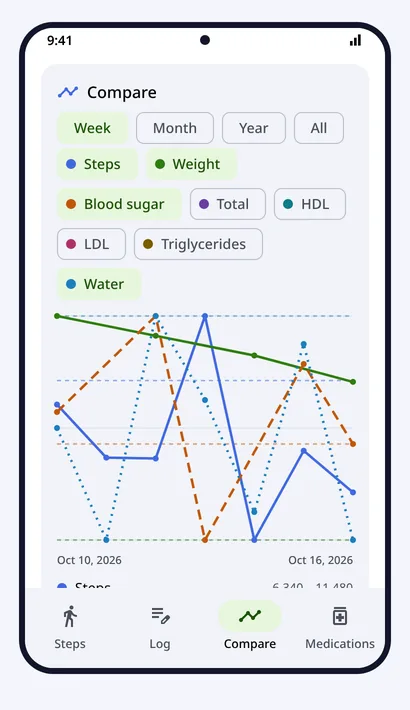
Compare
See steps, weight, blood sugar, cholesterol and water as lines on one chart, with your targets as dashed lines. Switch between Week, Month, Year and All, and tap the chart to see a day's values.
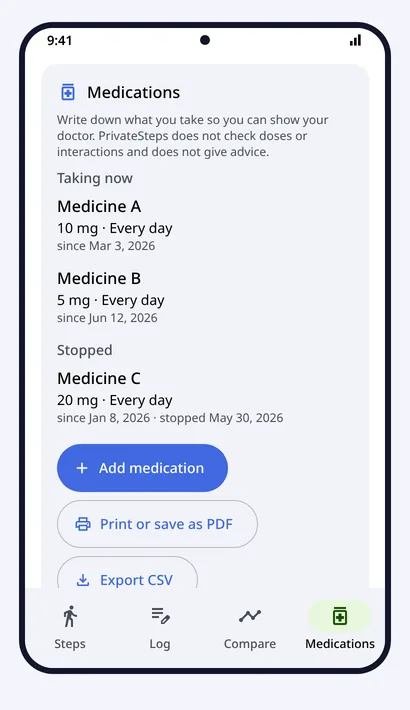
Medications
Keep a list of what you take, with the dose, how often and the dates. Print it, save it as a PDF or export it as a CSV file to show your doctor.
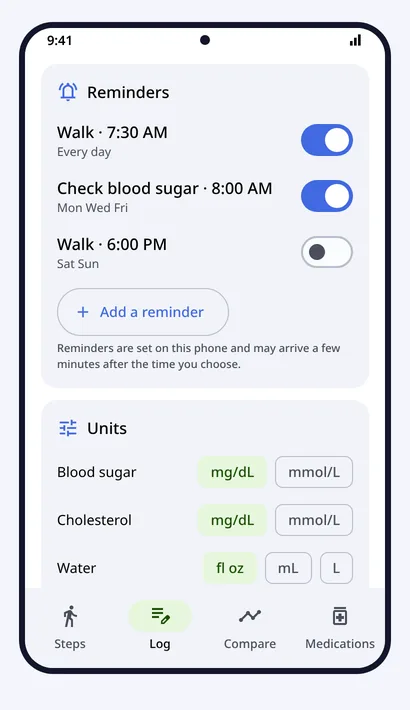
Reminders
Set reminders to walk or to check your blood sugar, on the days and times you choose. They are scheduled on the phone itself.
PrivateSteps only records your numbers and draws them next to your steps. It does not judge them or give advice.
Every feature, purpose, and your options
Today's count and goal circle
See where you are at a glance; the circle turns green when you hit the goal.
Day, Week, Month and Year reports
Spot patterns: your quiet hours, your best weekday, how this month compares.
Goals
A target that fits your life, not a fixed 10,000.
Records
A little encouragement without a leaderboard or a social feed.
Home screen widget
Check your count without opening the app.
Quiet ongoing notification
Android requires one for background counting; this one is silent and shows just your count.
Pause counting
Turn it off for a trip, a day off, or any reason — no uninstalling.
Export to CSV
Your data in a plain file you can open in any spreadsheet or keep as a backup.
Import
Move to a new phone or restore after a reinstall without any cloud.
Android backup
If you already trust your phone's backup, your steps and goals can ride along.
Erase all my data
Leave no trace when you want to.
Log, Compare and Medications
Keep your own numbers next to your steps.
Unlimited history
Years of context, stored only on your phone.
7-day free trial, then $5 a year
Try everything free. Cancel before the 7 days end and you pay nothing. Your data is never held hostage.
Battery setup help
Samsung and some other phones put apps to sleep; this gets you to the one setting that fixes it.
Questions
Which phones does it work on?
Android phones running Android 10 or newer with a built-in step counter sensor. Almost all modern phones have one. It's built on a Samsung Galaxy S25 Ultra and tested there first.
How accurate is it?
PrivateSteps reads the phone's own hardware step counter. It is as accurate as the phone, no more and no less. It makes no claims beyond recording and drawing your numbers; it gives no advice and draws no conclusions.
Does it drain the battery?
The sensor does the counting in hardware; the app reads it in low-power batches. Some phones, including Samsung, put apps to sleep, which can stop counting. Help explains the one setting to change.
How long is my history kept?
As long as you like. Nothing is deleted automatically. You can delete older data (keeping the last 1, 2, 5 or 10 years) or erase everything from the app at any time.
Can I move my steps to a new phone?
Yes. Export the full-detail CSV on the old phone and import it on the new one, or turn on the optional Android backup. Step by step.
What happens when the 7 days are up?
If you don't cancel, Google Play charges the yearly price ($5, shown in your currency) and the subscription renews automatically each year until you cancel. If you cancel before the 7 days end, you are never charged. Without a subscription, counting continues and nothing is deleted; history, charts, goals and records are locked until you subscribe. Your steps are saved the whole time, and you can export, import or erase them whenever you like. The notification and widget stop showing the number until then. Your data is never held hostage. Trial terms.
Is the price the same everywhere?
No. Google Play sets each country's price from local purchasing power and shows it in your currency before you start. The subscription is handled by the Google Play app; PrivateSteps itself still has no internet access.
How do I cancel?
Open Google Play, tap your profile picture, then Payments & subscriptions > Subscriptions > PrivateSteps > Cancel subscription. You can also tap Manage in the app. If you cancel during the free trial, you are never charged.
Will I be reminded before I am charged?
Yes. The app sets reminders on your phone: during the trial, the day before the first charge and on the day; after that, a month before each yearly renewal, a week before, and on the day. If you cancel, the reminders stop. Google Play also emails you about renewals.
Which languages?
53, picked automatically from your phone's language, including Spanish, Portuguese, French, German, Japanese, Korean, Hindi, Arabic and Chinese. Arabic, Hebrew and Urdu are fully right-to-left.
Refunds?
Purchases go through Google Play, so refunds follow Google Play's process. Details in Terms.